
How do I rename my Household?
A Household guardian can change the name shown for the family. Renaming the Household keeps its people and their Unit participation in place.
1. Open the Household name
Section titled “1. Open the Household name”Open More → Household, then select Edit in the header. The Rename household form shows the current name.
2. Enter the name you want to use
Section titled “2. Enter the name you want to use”Replace the name with the family name you want Woggle to display. To return to the default family name, clear the field.
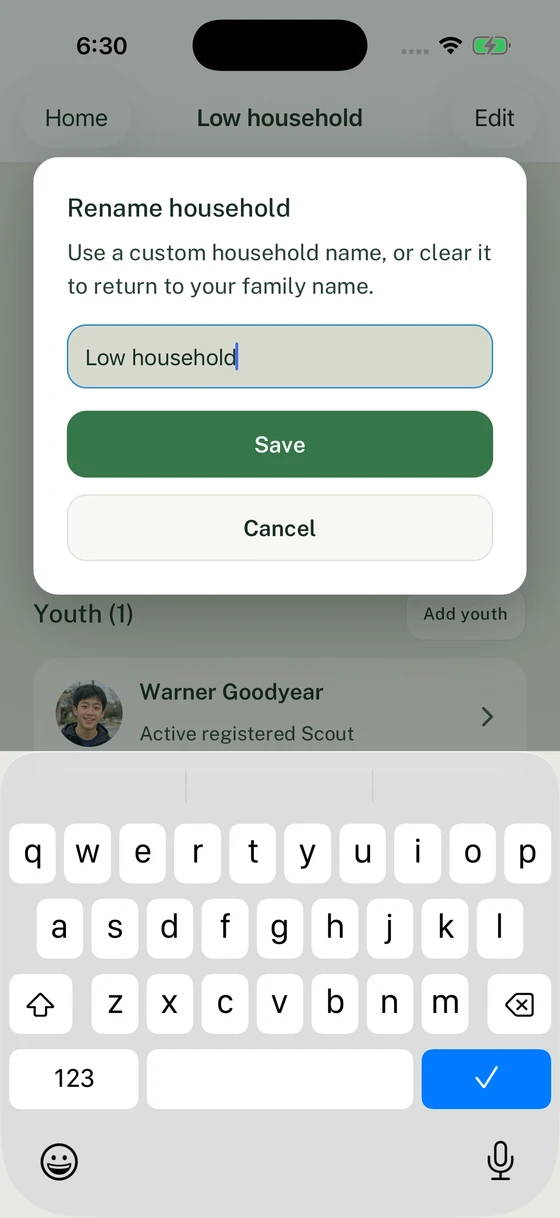
Save the family name, or clear the field to restore the default.
3. Save and check the result
Section titled “3. Save and check the result”Select Save. Check the updated name on the Household screen. If Woggle reports a problem, correct the highlighted field or retry before treating the name as saved.
If you cannot change the name, check that you are signed in as a guardian of this Household. To change an individual person’s name, use their profile details.
Thanks. Your feedback helps us keep this page useful.