
How do I add a youth to my Household?
A Household guardian can add a youth profile before the child has their own Woggle account. Check the family list first so you use an existing profile when one is already present.
1. Check for the child
Section titled “1. Check for the child”Open More → Household and look through the youth listed. If the child is already there, open that profile. Use Unit participation if the child needs to join a Unit, or a youth account invitation if they need their own sign-in.
If the child appears under the wrong family or more than once, follow Household profile troubleshooting before adding anyone.
2. Add the youth’s details
Section titled “2. Add the youth’s details”Select Add youth. Enter the child’s first name. Add a last name and notes if needed. Check the name before continuing.
3. Choose whether to invite an account
Section titled “3. Choose whether to invite an account”Leave Send a Woggle account invitation off to create the family profile without a sign-in invitation. You can share the youth’s account invitation from their profile later.
To invite the account now, turn on Send a Woggle account invitation and enter the youth’s intended account email. Check Woggle’s Youth Suitability guidance before inviting a youth account.
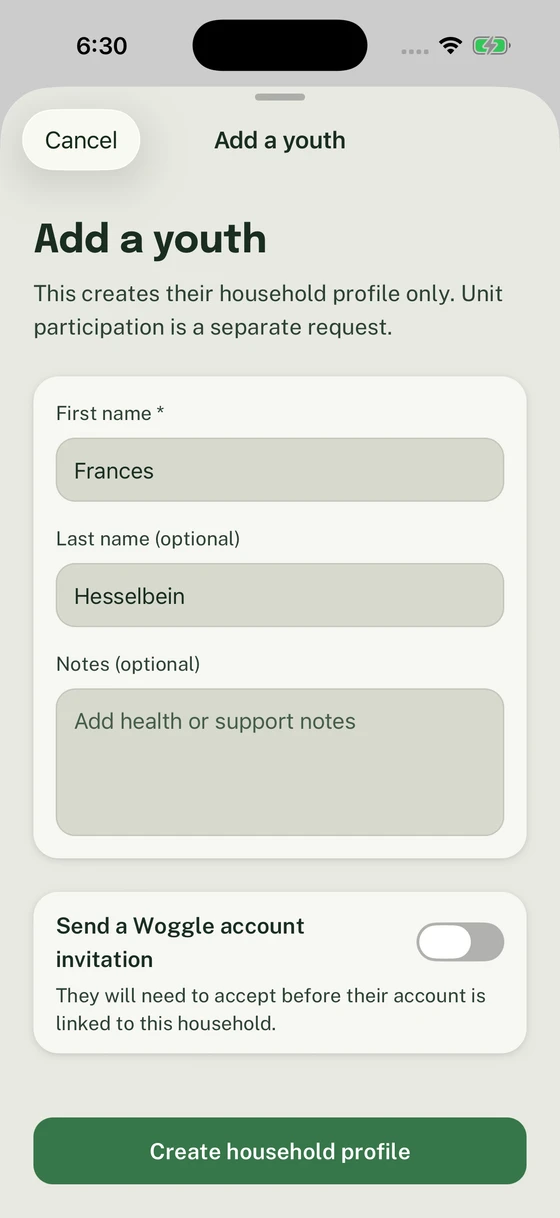
The account invitation is optional; Unit participation is requested separately.
4. Create the profile
Section titled “4. Create the profile”Select Create household profile, or Create and send invite if you enabled the invitation. Wait for the confirmation that the child is in your Household.
Choose Done to return to the family. If the child also needs to participate in the selected Unit, choose Request participation in the active unit and review the participation request. Adding the profile alone does not grant Unit access.
5. Confirm the family and participation
Section titled “5. Confirm the family and participation”Reopen Household and check that the youth appears once with the correct name. If you sent a participation request, track that separately in Inbox.
During family joining, Add youth or Add another youth also adds the child to your Household and includes them in that request. Use that path when you are already choosing who is joining.
If a Household request is already open for the selected Unit, the confirmation offers Continue household request for a draft or View household request for a submitted request. Use that existing request instead of starting another one. If Person not added appears, correct the error and retry with the details still in the form.
Thanks. Your feedback helps us keep this page useful.