
How do I remove someone from my Household?
A Household guardian can remove someone from the family. Woggle checks the effect on participation and parent access before applying the change.
If the person is only leaving one Unit, use Unit participation changes instead. If the person is in the wrong Household or appears twice, check the correction options before removing them.
1. Open the person’s Household profile
Section titled “1. Open the person’s Household profile”Open More → Household and select the adult or youth. Check that this is the person whose family relationship should end.
2. Remove a child or adult from the Household
Section titled “2. Remove a child or adult from the Household”Select Remove from household. Read the explanation and the people or Units listed. A Household spans Units, so the effects can extend beyond the Unit currently selected in Woggle.
3. Review participation and guardian access
Section titled “3. Review participation and guardian access”If the initial explanation matches your intent, select Remove from household on the review screen. Woggle completes an eligible removal or asks you to review an additional consequence:
| What Woggle shows | What to do |
|---|---|
| Unit participation must be deactivated | Review the affected participation. Choose Deactivate participation and remove only if those changes match your intent. |
| A review of changes to parent or guardian access | Check each listed effect before selecting Confirm removal. |
| A blocked removal | Read the reason and resolve that condition with the appropriate guardian, Unit Admin, or Support. |
Woggle prevents removal of the last guardian with an account while active youth still depend on that Household. An unlinked adult profile is not a replacement for that account-backed guardian.
For a participation-deactivation review, turn on I agree to deactivate unit participation before selecting Deactivate participation and remove. For an access review, turn on I agree to these access changes before Confirm removal. Each new or updated review needs its own acknowledgment.
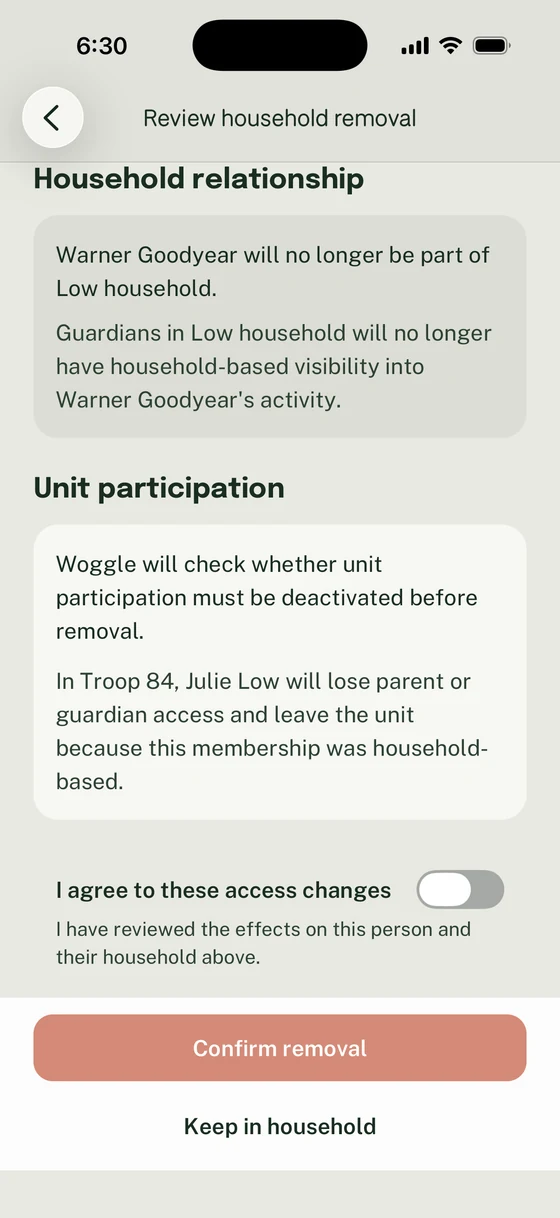
Read every listed effect before acknowledging the access changes. Confirm removal stays disabled until you agree.
If Woggle says the impact changed, read the updated effects before confirming. Wait for Removing… to finish; Back and Keep in household are unavailable while the removal is being completed. If the review does not match your intent, select Keep in household. A blocked review offers Back to profile.
4. Check the result
Section titled “4. Check the result”After Woggle confirms removal, return to Household and check the family list. Review affected Unit participation separately. Do not assume removing an adult from the family removes every independent Unit role they hold.
A linked Woggle account and profile are preserved when the Household relationship is removed. Removal is not an account-deletion request or a way to move someone into another Household. For an eligible adult move, ask a Unit Admin to use Add to a household. For account deletion or a change outside that process, contact Support with the intended outcome.
Thanks. Your feedback helps us keep this page useful.