
Good unit coordination is mostly a set of small promises kept visible: this is the date, this is the current plan, this person owns the next step, and this is where families will find a change.
The Scout Unit Coordination Toolkit packages five existing Woggle workflows into reusable working sheets. Use the browser version for a planning meeting, print only the sheet you need, or download the editable calendar files and polished PDFs.
Choose a tool
| If the unit needs to… | Start with | Best format |
|---|---|---|
| Share the year and review the next 90 days | Annual plan and monthly review | HTML, CSV, ICS, PDF |
| See whether one event is actually ready | Event-readiness tracker | HTML, CSV, PDF |
| Reconcile drivers, seats, and trip legs | Transportation manifest | HTML, CSV, PDF |
| Prepare families for resident camp | Summer-camp countdown | HTML, CSV, ICS, PDF |
| Explain a Woggle rollout without a launch speech | Seven rollout emails | HTML, PDF |
Annual-plan calendar and monthly review
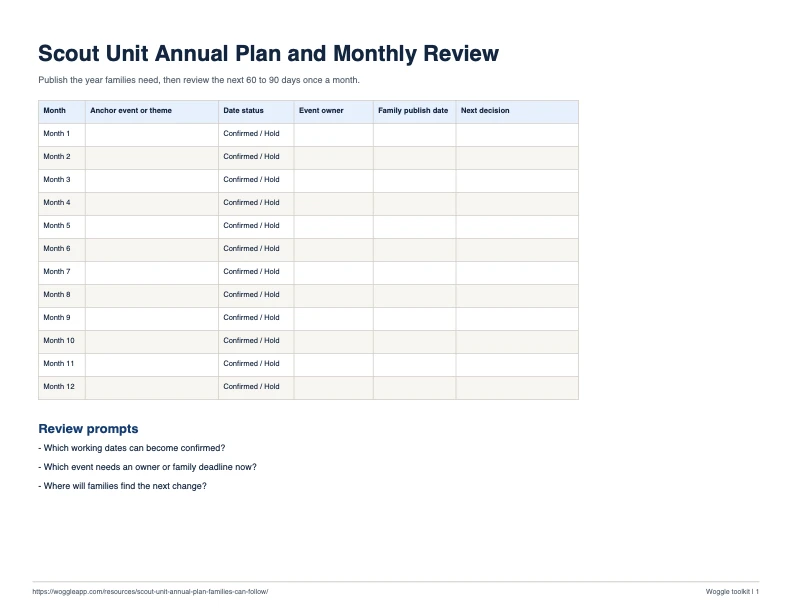
Use this after the unit’s planning conference. Publish the dates families need first, then hold a short monthly review for the next 60 to 90 days. Follow the full annual-plan guide for the planning and review rhythm.
The ICS file contains tentative example dates beginning in August 2026. Edit the dates for your unit before sharing or importing the calendar broadly.
| Month | Anchor event or theme | Date status | Event owner | Family publish date | Next decision |
|---|---|---|---|---|---|
| Month 1 | Confirmed / Hold | ||||
| Month 2 | Confirmed / Hold | ||||
| Month 3 | Confirmed / Hold | ||||
| Month 4 | Confirmed / Hold | ||||
| Month 5 | Confirmed / Hold | ||||
| Month 6 | Confirmed / Hold | ||||
| Month 7 | Confirmed / Hold | ||||
| Month 8 | Confirmed / Hold | ||||
| Month 9 | Confirmed / Hold | ||||
| Month 10 | Confirmed / Hold | ||||
| Month 11 | Confirmed / Hold | ||||
| Month 12 | Confirmed / Hold |
Monthly 90-day review
- Which dates moved from hold to confirmed?
- Which event needs an owner this month?
- What must families decide, pay, submit, bring, or volunteer for next?
- Which deadline should be published now rather than in the final week?
- Where will the current plan and any change live?
Event-readiness tracker
Review one row per event dependency. A green event has a current answer, a named owner, and a family-facing deadline. Use the Scout event planning checklist to work through each dependency in context.
| Dependency | Status | Owner | Family deadline | Current source | Next action |
|---|---|---|---|---|---|
| Date, time, and location | Red / Amber / Green | ||||
| Audience and family expectations | Red / Amber / Green | ||||
| RSVP and final headcount | Red / Amber / Green | ||||
| Cost and payment instructions | Red / Amber / Green | ||||
| Forms and required records | Red / Amber / Green | ||||
| Transportation | Red / Amber / Green | ||||
| Food, gear, and accessibility | Red / Amber / Green | ||||
| Adult coverage and volunteers | Red / Amber / Green | ||||
| Weather or cancellation plan | Red / Amber / Green | ||||
| Final family update | Red / Amber / Green |
Transportation manifest
This is a working coordination sheet, not an official driver, vehicle, insurance, health, or permission record. Keep sensitive verification in the process your unit and council require. Review the Scout trip transportation plan for the privacy boundary and current Scouting America transportation guidance.
Event: ____________________ Date: ____________________ Coordinator: ____________________ Backup: ____________________
| Vehicle label | Trip leg | Seats after own household | Assigned riders | Open seats | Status |
|---|---|---|---|---|---|
| Vehicle 1 | Outbound / Return / Both | Proposed / Confirmed | |||
| Vehicle 2 | Outbound / Return / Both | Proposed / Confirmed | |||
| Vehicle 3 | Outbound / Return / Both | Proposed / Confirmed | |||
| Vehicle 4 | Outbound / Return / Both | Proposed / Confirmed | |||
| Vehicle 5 | Outbound / Return / Both | Proposed / Confirmed | |||
| Vehicle 6 | Outbound / Return / Both | Proposed / Confirmed | |||
| Vehicle 7 | Outbound / Return / Both | Proposed / Confirmed | |||
| Vehicle 8 | Outbound / Return / Both | Proposed / Confirmed | |||
| Vehicle 9 | Outbound / Return / Both | Proposed / Confirmed | |||
| Vehicle 10 | Outbound / Return / Both | Proposed / Confirmed |
Meeting point and arrival window: ________________________________________________
Return trigger and pickup window: _________________________________________________
Where families will find a change: ________________________________________________
Summer-camp countdown
Plan four focused updates instead of one enormous camp email. Use the summer-camp family communication countdown to keep official camp, council, and unit information in the right place.
The ICS file uses a tentative June 14, 2027 camp date to place the four example checkpoints. Edit the camp date and checkpoint dates for your unit before sharing.
| Checkpoint | Family message | Leader review | Owner | Send date |
|---|---|---|---|---|
| 90 days | Dates, location, estimate, RSVP, next update | Confirm published camp source and initial count | ||
| 60 days | Registration, payment, forms, gear, travel outline | Verify current council and camp instructions | ||
| 30 days | Targeted gaps and first-time family support | Review attendee, adult, travel, and task gaps | ||
| 7 days | Arrival, travel, weather, packing, final update channel | Lock current logistics and escalation owner |
Seven rollout email templates
Open the interactive rollout template library for seven copy-ready messages and placeholders for a pack, troop, or other unit. Use the PDF for a leader meeting or offline review.
- Introduce Woggle and explain what is changing.
- Explain what stays in Scoutbook or another official system.
- Ask families to check their Household and access.
- Point families to the first real Event and RSVP.
- Explain Groups, Channels, and the intended audience.
- Follow up only with families who still need help.
- Close the first rollout loop and name the next habit.
Use these as working tools
Adapt the labels to your program and current local requirements. Do not put medical details, driver credentials, private family notes, or other sensitive records into a shared worksheet simply because a template has an empty cell. A useful template makes coordination visible while leaving official and sensitive information in the right place.

