A new committee chair opens the unit laptop and finds the whole system spread across five places. Advancement lives in Scoutbook. Campout chatter lives in GroupMe. The calendar is half-updated. The permission slip reminder is in an email thread. The snack signup is in a spreadsheet somebody copied from last year.
At the next committee meeting, the question comes up: “Should we use Scoutbook, GroupMe, or something else?”
That sounds like a tool question. Most of the time, it is really an ownership question. Which system owns official records? Which system owns casual conversation? Which system owns the practical work of getting families to the right place, with the right forms, at the right time?
That is the better way to think about Scoutbook vs GroupMe vs Woggle. They are not the same kind of tool, and a healthy unit should not force one of them to do every job.
The Core Mistake: Treating Every Tool Like the Official System
Scout units do a strange mix of work. They track advancement, plan meetings, collect RSVPs, communicate with parents, support youth leadership, coordinate volunteers, chase forms, and handle last-minute changes. Those jobs feel related because the same volunteers often do them, but they do not all belong in the same place.
When the tool ownership is fuzzy, leaders end up with three recurring problems:
- Families do not know where to look first.
- Leaders duplicate updates across channels to be safe.
- Important details get treated like conversation instead of decisions.
Nobody creates this mess on purpose. It usually grows one small workaround at a time. Group chat was easy, so it became the place for campout questions. A spreadsheet worked once, so it became the signup system. Scoutbook is official, so somebody assumes it should also be the day-to-day coordination hub.
The fix is not to declare one app the winner. The fix is to decide what each tool is responsible for.
What Scoutbook Is Actually For
Scoutbook and Scoutbook Plus are official Scouting America systems. Scoutbook’s public positioning focuses on tracking advancement, milestone achievements, and Scouting activity along the way. The Scoutbook Knowledge Base also describes Scoutbook Plus as one advancement system of record for Scouting America.
That matters. Advancement and official records are not casual coordination details. They need an authoritative home.
In practice, Scoutbook is the right place for work like:
- Advancement records
- Scout progress and requirements
- Official roster-connected records
- Reports tied to advancement and unit administration
- Activity records where your unit uses Scoutbook Plus for that purpose
- Official calendar items when your unit has chosen to maintain them there
Scoutbook can support calendar and communication workflows, and many units use those features. But that does not automatically make Scoutbook the best place for every operational detail around a campout, pack meeting, service project, or den activity.
For many volunteers, the day-to-day pain is not “Where do I record advancement?” It is “Who is coming, who still owes the form, who is bringing the cooler, and did every parent see the change?”
Those are coordination problems.
What GroupMe Is Actually For
GroupMe is a group messaging app. Microsoft’s own support docs describe GroupMe as a free group messaging app, with group chats, direct messages, announcement groups, search, and polls.
That makes GroupMe useful for quick conversation:
- “Running five minutes late.”
- “Great job at the service project today.”
- “Does anyone have a spare neckerchief slide?”
- Sharing a reminder that points families back to the official event details.
- Light parent-to-parent discussion when the unit expects that channel to be informal.
The problem is not that group chat is bad. The problem is using group chat as the unit’s operating system.
Chat is chronological. Scout coordination is structured. A chat thread can answer a question in the moment, but it is a poor place to maintain the final answer. If three parents reply “yes,” one parent replies “maybe,” and another parent texts the Cubmaster separately, the leader still has to rebuild the real headcount somewhere else.
GroupMe also treats messages as conversation first. That is fine for casual chatter. It is weaker for decisions that need family-level visibility, event context, reminders, and follow-through.
If your unit is struggling with this pattern now, the guide on why group chat fails Scout unit coordination goes deeper into the mismatch.
What Woggle Is Actually For
Woggle is meant to sit in the coordination gap between official records and open-ended chat.
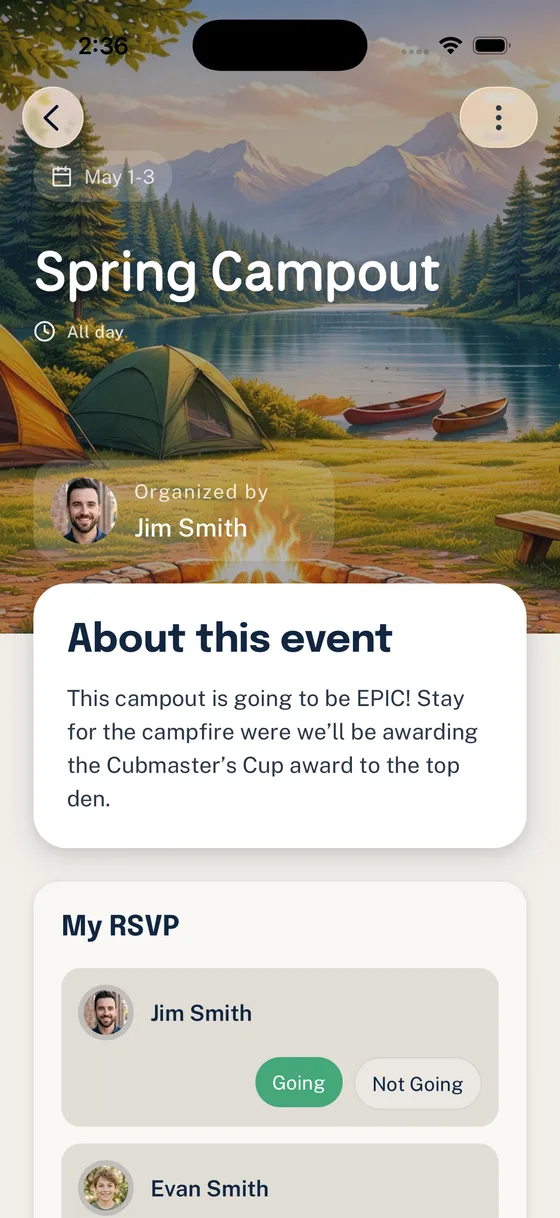
That means Woggle should not replace Scoutbook. Scoutbook remains the place for records and advancement. Woggle is the day-to-day coordination layer around the work families and leaders need to act on: events, household RSVPs, announcements, volunteer roles, reminders, and clearer family visibility.
The practical distinction is:
- Scoutbook answers: “What is the official record?”
- GroupMe answers: “What are people talking about right now?”
- Woggle answers: “What needs to happen, who is responsible, and which families have responded?”
That third question is where many units lose the most time.
Which Tool Should Own Which Job?
Use this table as a starting point for your unit. Adjust it to match your council guidance, chartered organization expectations, and the systems your volunteers can realistically maintain.
| Unit job | Best owner | Why |
|---|---|---|
| Advancement records | Scoutbook or Scoutbook Plus | Official advancement and recordkeeping need an authoritative system. |
| Rank, merit badge, and requirement tracking | Scoutbook or Scoutbook Plus | These records should stay connected to the Scouting America advancement workflow. |
| Casual parent conversation | GroupMe or another chat tool | Quick back-and-forth works well when it is not the source of truth. |
| Event details families need to trust | Woggle or another structured coordination layer | Time, location, cost, gear, forms, and changes need to stay attached to the event. |
| Household RSVPs | Woggle or another household-aware workflow | Scout units coordinate families, not isolated usernames. |
| Volunteer roles | Woggle or another role-tracking workflow | Leaders need visible owners, open gaps, and follow-up, not scattered replies. |
| Permission slip reminders | Woggle, with official form requirements checked separately | The form requirement may be official or local, but the follow-up workflow needs structure. |
| Last-minute conversation | GroupMe, text, or Woggle messaging depending on unit practice | Urgent updates may need quick reach, but final details should be reflected in the event record. |
| Official policy or Youth Protection questions | Current Scouting America, council, and unit guidance | Do not rely on a chat thread or third-party app copy for policy decisions. |
The goal is not perfection. The goal is for every family to know where the real answer lives.
A Simple Rule for Leaders
When you are deciding where to put something, ask this:
Is it a record, a conversation, or an action?
If it is a record, put it in Scoutbook or the official system your unit is expected to use.
If it is a conversation, chat can be fine. Keep it lightweight and make sure families understand it is not the permanent source of event truth.
If it is an action, put it somewhere structured. RSVPs, volunteer roles, form follow-up, drivers, gear, and attendance planning need an owner, a deadline, and visibility.
This rule helps prevent the common trap where a leader posts an action item in chat, then spends the next week manually interpreting reactions, side texts, and half-answers.
What This Looks Like for a Campout
Here is a cleaner workflow for a typical campout:
- Put official advancement or activity records where your unit records them.
- Create the event in the coordination system with the time, location, cost, gear, forms, and RSVP deadline.
- Ask each household to respond once for the family.
- Add volunteer roles to the event: drivers, grubmaster support, trailer pickup, health-form check, and cleanup.
- Use chat for casual questions and quick reminders, but point people back to the event for the latest details.
- After the event, update official records in Scoutbook or Scoutbook Plus as appropriate.
This keeps the recordkeeping official, the conversation human, and the coordination visible.
How to Move Without Starting a Tool Fight
Tool changes can make parents tired before they even start. The best rollout language is usually simple:
We are keeping Scoutbook for advancement and official records. We are keeping chat for casual conversation. We are moving event coordination, RSVPs, and volunteer follow-through into one clearer place so leaders are not rebuilding the plan from texts and spreadsheets.
That framing matters because it does not ask families to reject a tool they already know. It explains the job each tool owns.
If your unit is moving from GroupMe-heavy coordination, the 30-day transition guide gives a more detailed rollout path.
Once the unit has chosen its stack, move from evaluation to implementation with Scoutbook vs. Woggle: What Goes Where. That operational guide assigns each recurring job an owner so families are not left with three possible sources of truth.
The Bottom Line
Scoutbook, GroupMe, and Woggle do not need to compete for the same job.
Scoutbook is the official records and advancement home. GroupMe can still be useful for conversation. Woggle is built for the practical coordination work that sits between them: household responses, event context, reminders, volunteer ownership, and family follow-through.
When units define those lanes clearly, leaders spend less time interpreting scattered messages and families spend less time wondering which app has the real answer.
For requirements beyond the three-way comparison, use the Scout troop communication app checklist and the Scouts BSA communication-plan guide. If the unit is weighing a named chat platform, the BAND comparison and Spond comparison keep the decision tied to Scout workflows rather than feature counts alone.