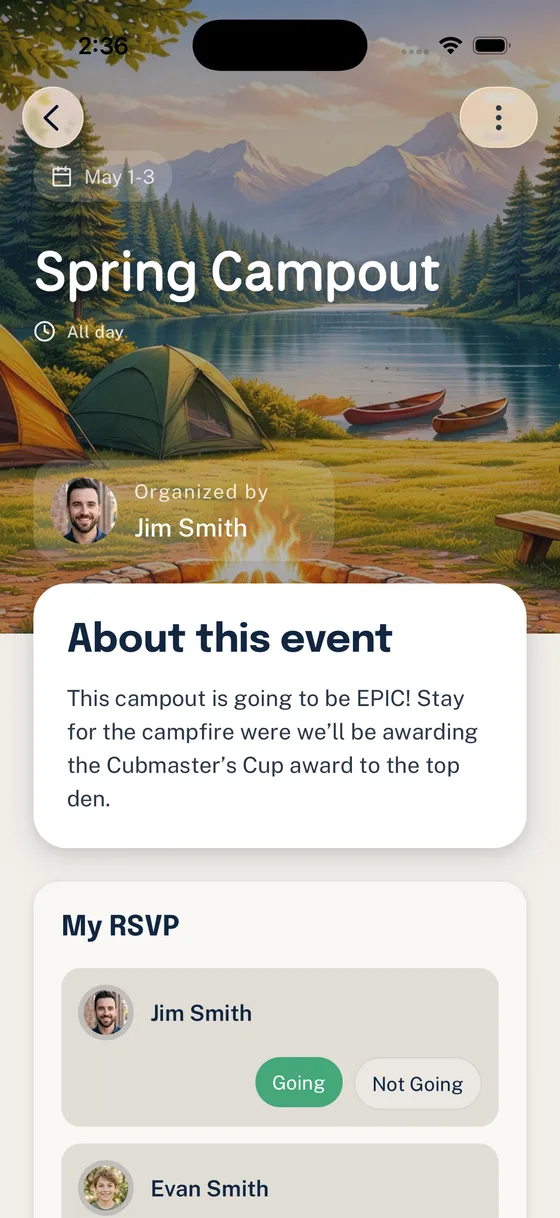
A parent catches you after the meeting and asks, “Is the campout address in Scoutbook, GroupMe, email, or that spreadsheet from last month?”
You know the answer, but it is not a simple one. The date is on the calendar. The packing note was posted in chat. The RSVP is on a form. The permission slip went by email. The advancement record is in Scoutbook. The volunteer signup is in a spreadsheet only the event chair can edit.
Nothing about that is unusual. Most Scout units do not have a communication problem because leaders are careless. They have one because every tool in the unit was adopted to solve a different emergency.
The better question is not “What app should our troop use?” It is “What job are we trying to get done?”
Start With Workflow Ownership
Before changing tools, name the work. A unit usually has several different kinds of information moving at once:
- Official membership and advancement records
- Calendar dates and activity history
- Event details, RSVPs, reminders, and permission slips
- Volunteer roles and follow-through
- Casual conversation and quick questions
- Long-term reference information for families
When those workflows share the same channel, families have to guess what matters. Leaders become the human index. New parents learn the system by bothering someone who already knows it.
A healthier setup gives each workflow an owner, a home, and a rule of thumb.
| Workflow | Best home | Why it belongs there |
|---|---|---|
| Advancement records, awards, and official reporting | Scoutbook / Scoutbook Plus | This is official Scouting infrastructure and should stay connected to Scouting America records. |
| Unit calendar dates and activity logs | Scoutbook Plus calendar or your unit’s official calendar | Dates need one recognized source of truth that families can subscribe to. |
| Casual conversation and quick back-and-forth | Chat | Chat is useful for human conversation, photos, simple questions, and lightweight reminders. |
| Event RSVPs, packing details, forms, and volunteer jobs | Coordination layer | These need structure, status, reminders, and family-level visibility. |
| Committee files and long-term documents | Shared drive or unit file system | Reference material should not disappear into chat history. |
| Emergency or last-minute changes | Direct, redundant channels | Urgent changes deserve the fastest reliable path, not just the neatest one. |
The table is not a law. It is a way to stop treating every message like it belongs everywhere.
What Belongs in Scoutbook
Scoutbook and Scoutbook Plus should be treated with respect because they are tied to official Scouting workflows. Scouting America’s Scoutbook materials describe Scoutbook as an advancement tracking tool with messaging, forums, service, hiking, camping tracking, and calendaring features. Scoutbook Plus documentation also covers unit calendars, RSVP options, activity logs, reports, permissions, and parent or guardian relationships.
That means Scoutbook is a strong fit for:
- Advancement tracking and approvals
- Award and purchase reports
- Official advancement visibility for Scouts, parents, and leaders
- Membership-connected records and permissions
- Activity logs when your unit uses them consistently
- Calendar entries that need to connect back to Scouting records
If the question is “What is the official record?” the answer should usually point back to Scoutbook or another official Scouting America system. Do not move advancement truth into a chat app, a private spreadsheet, or a volunteer’s personal notes.
The practical challenge is that “Scoutbook has a feature for this” and “families reliably use this workflow for weekly coordination” are not always the same thing. Unit leaders still have to decide how much day-to-day operational work they want to run through Scoutbook, how well families are trained on it, and what their council or unit expects.
When in doubt, verify current Scoutbook help materials and local expectations. Scoutbook and Scoutbook Plus continue to evolve, especially around calendars, permissions, and messaging.
What Belongs in Chat
GroupMe, WhatsApp, text threads, Slack, and similar tools are not useless. They are just usually asked to do too much.
Chat is good for:
- Quick clarifying questions
- Photos after an activity, if your unit’s policies allow it
- “I’m running five minutes late”
- Friendly leader-to-leader coordination
- Social connection between families
- Pointing people to the official source of truth
Chat is weak when the unit needs a durable answer:
- Who has actually RSVP’d?
- Which family still owes a form?
- Who is bringing the water cooler?
- Did the new parent see the location change?
- Which message had the final packing list?
That is not a failure of families. It is how chat works. A chat thread is a stream. Scout unit coordination often needs a record.
A useful rule is: chat can discuss the thing, but it should not be the thing. If an event detail matters tomorrow, next week, or at check-in, put it somewhere structured and link to it from chat.
What Belongs Somewhere Else
The messy middle is where most units lose time. Event coordination is not purely official recordkeeping, but it is also not casual conversation.
This includes:
- RSVPs by Scout, parent, or household
- Permission slip status
- Driver counts
- Gear lists
- Food assignments
- Volunteer jobs
- Reminder schedules
- Event-specific questions
- Family follow-up
These workflows need context. A volunteer signup is different when it is attached to a specific campout, a specific time window, and a clear role. An RSVP is more useful when it shows the household picture, not just one parent’s “yes” buried under twenty replies. A reminder works better when it goes only to the families missing something.
This is where a coordination layer can help. It does not replace Scoutbook. It does not need to become the official advancement record. Its job is to keep the operating work of the unit close to the events and families it affects.
For Woggle, that means focusing on Scout unit coordination: events, RSVPs, household-aware participation, channels, reminders, and volunteer follow-through. Scoutbook remains the right place for official Scouting records. Chat can remain useful for conversation. Woggle sits in the space where leaders need structure without turning every parent question into another spreadsheet.
A Simple Decision Framework
Use these questions before posting or creating anything new.
1. Is this an official Scouting record?
If yes, keep it in Scoutbook, Scoutbook Plus, or the official system your council expects.
Examples:
- Advancement completion
- Awards and reports
- Membership-connected permissions
- Official activity history, if your unit records it there
2. Will someone need to find this later?
If yes, do not rely on chat alone.
Examples:
- Campout address
- Cost and payment instructions
- Required gear
- Departure time
- Permission slip deadline
Post the durable version in the event, calendar, form, or shared file location. Then use chat only to point people there.
3. Does this need a response or status?
If yes, use a system that tracks the response.
Examples:
- RSVP yes/no/maybe
- Volunteer role claimed
- Form submitted
- Driver available
- Food assignment confirmed
If you cannot see who has responded without scrolling or manually tallying, the workflow is in the wrong place.
4. Is this just conversation?
If yes, chat is fine.
Examples:
- “Does anyone have an extra camp chair?”
- “Thanks for a great hike.”
- “The parking lot is full; use the side entrance.”
- “Can someone remind me what time flags start?”
Even then, if the answer becomes official or durable, move it back to the source of truth.
A Practical Unit Setup
Here is a simple pattern that works for many units:
- Scoutbook / Scoutbook Plus: advancement, official records, official calendar where required, reports, and Scouting-connected permissions.
- Woggle or another coordination layer: event pages, RSVPs, household participation, volunteer jobs, reminders, and recurring unit communication.
- Chat: quick discussion, casual updates, and links back to the real source of truth.
- Shared drive: committee documents, annual plans, budget files, and long-term reference material.
The important part is not the exact tool list. It is that families know where to look.
Write the rule plainly for your unit:
Scoutbook is for official Scouting records. Woggle is for event and family coordination. Chat is for conversation and quick updates. If a detail affects attendance, forms, money, or volunteer coverage, it belongs in the event or coordination system first.
That one paragraph can save months of confusion.
How to Roll This Out Without a Big Meeting
You do not need a technology summit. Use the next real event.
Pick one campout, service project, pack meeting, or court of honor. For that event only:
- Put the official date on the calendar.
- Put the event details, RSVP, forms, and volunteer roles in the coordination layer.
- Use chat only to link families back to the event.
- At the meeting, remind families where each kind of information lives.
- After the event, ask leaders what still got lost.
Then repeat with the next event.
Most families do not need a lecture about systems. They need a predictable answer to “Where do I look?”
The Goal: Fewer Places to Guess
Scout units will always use more than one tool. That is normal. Advancement, conversation, events, files, and volunteer work are different jobs.
The problem is not having multiple tools. The problem is making families guess which tool contains the current answer.
Put official records in the official system. Let chat be chat. Give coordination work a structured home. Then tell families the rule often enough that it becomes boring.
That is when the unit starts to feel calmer, not because every message disappeared, but because the important ones finally have a place to land.