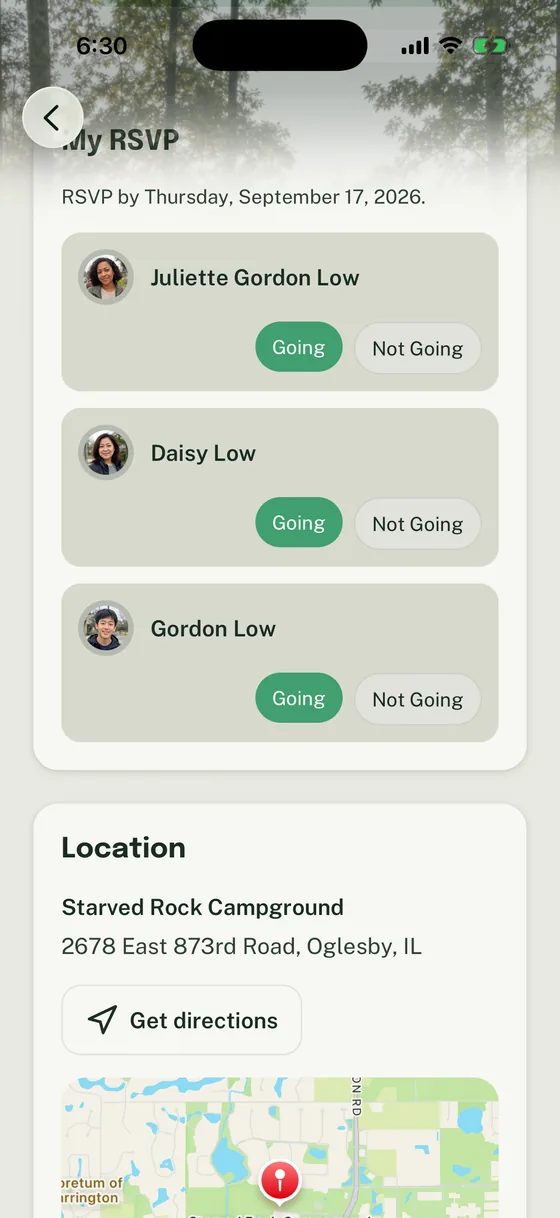
An RSVP can be accurate and an event can still go wrong. One caregiver marked a Scout as going; another caregiver, who is handling Saturday pickup, never saw the changed trailhead or packing list. The Scout is then asked to carry the update between adults, even though the unit already has a calendar and a communication channel.
Run a simple coordination rule: record only the contacts and preferences the unit needs, put the current plan in one place, and make it clear whose response covers which attendees. This guide offers a copyable protocol for doing that respectfully.
Start with the operational question, not a family assumption
Units do not need to know why a child has more than one caregiver, who makes legal decisions, or what happens in either home. Those details can be private, sensitive, and outside a volunteer’s role.
The useful questions are narrower:
- Which adults are approved by the family and unit process to receive routine unit information?
- How does each contact prefer to receive ordinary event updates?
- Who should the unit contact for a time-sensitive event question?
- Does an RSVP answer for one person, one household, or several named attendees?
- Is there a unit-approved instruction about pickup, release, transportation, or information sharing that the event lead must follow?
Use the answers the family supplies through the unit’s approved record process. Do not infer them from surnames, who attended the last meeting, or which adult replied most recently. If the record is unclear, pause and ask the unit’s designated contact to confirm the practical communication path. Do not ask the Scout to explain it.
Use “parent, guardian, or caregiver” so families do not have to disclose more than the unit needs. The U.S. Department of Education likewise recommends asking families for their preferred communication method. Its kinship-caregiver resource is a useful language reference.
Give every event one current home
The event page, calendar entry, or other designated record should answer the practical questions before any caregiver has to hunt through a thread:
- date, arrival time, end time, location, and parking or pickup instructions
- who is invited, including whether adults, siblings, or guests are part of the plan
- RSVP deadline and what a complete response includes
- gear, cost, food, form, and weather information when relevant
- a named event contact and where an update will appear if details change
Use texts, emails, or announcements to point caregivers back to that current plan.
For example, a Cub Scout pack moves a hike from the school parking lot to a trailhead. The event lead updates the location once, then sends the same short notice to the approved caregiver audience. A grandparent who normally does pickup sees the actual change in the event details rather than relying on a forwarded screenshot. A troop can use the same pattern when a campout’s gear note changes after a weather update.
The same pattern protects privacy. Scouting America says youth protection policies apply online and that parents should be able to observe program activity; its guidance also calls for safeguarding personal information. Review the current digital-safety guidance and follow your council and unit policies for any sensitive information. A unit calendar is not the place to explain a family’s circumstances.
Make the RSVP say what it covers
Ask for the planning answer when one adult is dropping off, another is picking up, and only one Scout is attending.
Use a prompt like this:
Please respond for each person attending from your household by Wednesday at 8 p.m. Include the Scout, adults, and siblings who will be there. The pickup plan is in the Event details; contact [name] privately if the approved pickup arrangement changes.
That wording separates attendance from transportation and avoids assuming that the person replying will be at the event. It also gives leaders a clear next step: follow up only on missing responses, not with a blanket reminder to every family.
Three common cases show why:
- Two caregivers, one attendee: One caregiver marks the Scout going. The other is the pickup contact. The event detail remains available to both appropriate caregivers; the unit does not treat the RSVP as a pickup authorization.
- Two Scouts, different plans: A caregiver marks one sibling going and one not going. The event lead gets a usable headcount without translating a text into a spreadsheet.
- A late change: A caregiver learns Friday that the family cannot attend. They update the RSVP and contact the named event lead through the unit’s approved channel. The leader adjusts food or materials; no one asks the Scout to relay a message at the meeting.
For a deeper event setup, use the checklist for better Scout event descriptions. For a non-product RSVP workflow, run the RSVP without chasing every family by text.
Use this caregiver coordination protocol
Copy this into a leader handoff, welcome process, or event planning note. Keep it limited to operational facts, and use the unit’s approved systems for records and permissions.
CAREGIVER COORDINATION PROTOCOL
[ ] Ask each family for the parent, guardian, or caregiver contacts the unit needs for routine communication.[ ] Record each contact's preferred routine communication method through the unit's approved process.[ ] Identify the one current home for calendar and event details.[ ] Confirm who receives a time-sensitive change and who is the event's named contact.[ ] State what an RSVP covers: each Scout, adult, sibling, guest, or only the responding household.[ ] Keep pickup, transportation, release, and sensitive instructions in the approved unit or council process; do not make an RSVP stand in for them.[ ] Send an update to the appropriate approved caregiver audience, then point back to the current Event or calendar entry.[ ] Treat a missing response as “unknown,” not “no.” Follow up with the appropriate contact.[ ] If the family's communication path is unclear, ask the designated unit contact to confirm it. Do not ask the Scout to carry messages or interpret adult arrangements.[ ] Review contacts when a family asks, a seasonal plan changes, or a routine update repeatedly misses the needed person.
Neutral messages leaders can use
When the schedule changes
Hi [name], the [event] arrival time has changed to [time]. The current location, pickup time, and gear note are in [event/calendar link]. Please review the update and contact [event lead] through [approved channel] if your household’s attendance changes.
When the RSVP is incomplete
Hi [name], we do not yet have a complete response for [event] on [date]. Could you check the Event and mark the people from your household who are Going or Not Going by [deadline]? This helps us plan [food/materials/space].
When a logistics detail needs confirmation
Hi [name], before [event], please review the current arrival and pickup details at [link]. If there is a change the event lead needs to know about, please contact [name] directly through [approved channel]. We will keep the Event page updated if the plan changes.
Each message stays with the plan the unit needs to run. It does not ask a caregiver to explain a private arrangement or make the Scout carry information between adults.
Do not turn coordination into a legal guess
A well-intentioned volunteer can create a real problem by assuming that the adult who appears most often is the only person who should receive a routine update. The opposite mistake is just as risky: copying every known adult into every message without checking the unit’s approved contact information.
The failure mode often appears on event day: a leader posts a pickup change in general chat, the usual RSVP contact sees it, and the adult driving does not. Do not tell the Scout to relay the change. Use the approved contact path and update the single current event record. The Scout trip transportation plan can help organize event-day coordination, but it does not replace Scouting America, council, or unit requirements.
Where Woggle can support the pattern
A unit using Woggle can keep family context in a Household, put current details on an Event, collect Household RSVPs for attendees, and use an Announcement to point the appropriate audience back to the updated plan.
It does not decide who should receive information or replace Scoutbook, council processes, official records, permissions, or transportation rules. Family visibility in Scout communication tools offers a broader way to evaluate those boundaries.
Before your next event, confirm the approved caregiver communication path, make the pickup instruction easy to find, or rewrite the RSVP so it says exactly who is responding for whom. Then use that practice consistently.