
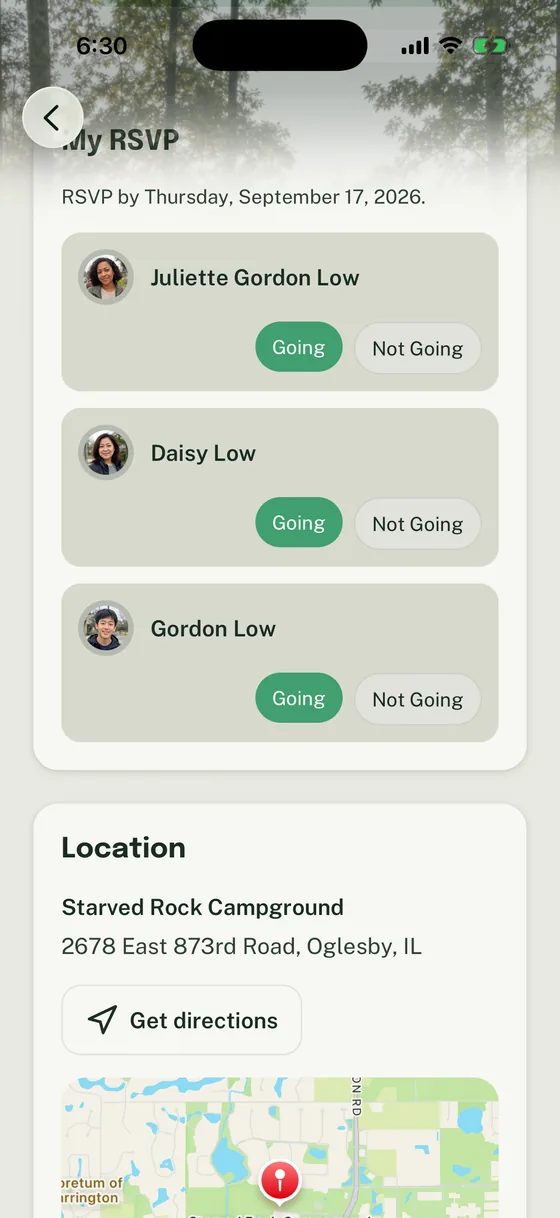
Household-aware RSVPs help Scout units answer the question leaders actually have before an event: who is coming from this family?
That sounds simple until one parent replies in chat, another parent asks later, a sibling is included, and the event chair still cannot tell whether the count is one Scout, two Scouts, an adult driver, or the whole family. Woggle keeps the RSVP tied to the Event and lets a Household response reflect the people who may actually attend.
What Household-Aware RSVP Means
Your Household holds family profiles across Units. An Event shows eligible people based on participation in its Unit and its audience. A profile added to the Household is not automatically eligible for that Unit’s RSVP. If someone is missing, check Household participation and request outcomes before creating another profile.
In Woggle, a Household is the family context around Scouts, parents, guardians, and other connected Members. A household-aware RSVP lets that response happen in the same place as the Event details instead of forcing leaders to interpret loose replies from a text thread.
For a Scout unit, that matters because the useful planning answer is often not “Bob clicked yes.” It is closer to:
- Bob is attending.
- Jane is not attending.
- A parent or guardian is attending.
- A sibling or second youth in the Household may affect the count.
- The family has not answered yet.
Woggle is not replacing Scoutbook, advancement records, medical forms, permission slips, or your unit’s official recordkeeping. It is the coordination layer for the Event question families need to answer before the leader buys food, confirms drivers, or sends the final reminder.
Before You Ask Families to RSVP
Make the Event clear enough that families can answer without opening a side conversation.
Before sending the RSVP request, confirm:
- the Event name is recognizable to families
- date, start time, end time, and location are filled in
- the RSVP deadline is tied to a real planning need
- the audience is correct for the Group or Unit
- any adult coverage, driver, food, gear, or form notes are in the Event description
- one leader owns final headcount decisions
If a parent has to search a group chat for the address, gear note, or whether siblings are invited, the RSVP will still create extra work.
How Families Respond
For families, the practical flow is straightforward:
- Open the Event.
- Review the Event details and RSVP deadline.
- Check the Household members shown in the RSVP panel.
- Mark each attendee as Going or Not Going based on the plan.
- Update the response if the family plan changes before the deadline.
The important difference is that the family can respond in context. A parent is not just reacting to a reminder; they are looking at the Event details while deciding who from the Household is attending.
When an event involves more than one caregiver or household, keep the question just as clear: an RSVP records attendance, not a pickup authorization or an assumption about who receives every update. Two Homes, One Scout Calendar offers a practical communication protocol for that situation.
Common Scout RSVP Scenarios
Use this table when explaining household-aware RSVPs to leaders or parents.
| Scenario | What the family should do in Woggle | What the leader learns |
|---|---|---|
| One Scout attending | Mark that Scout Going | Count one attending youth |
| Parent attending with Scout | Mark the Scout and adult Going if both appear in the Household RSVP | Plan adult headcount and coverage more clearly |
| One sibling attending, one not | Mark each Member separately | Avoid treating the whole family as one yes |
| Family cannot attend | Mark the relevant Members Not Going | Stop sending RSVP chase reminders to that family |
| Family is not sure yet | Follow the unit’s policy, such as waiting to answer until the plan is real or converting uncertain responses by a soft deadline | Keep the count honest instead of treating “maybe” as a commitment |
| Driver or volunteer details are needed | RSVP for attendance, then use the Event’s volunteer or instruction flow where provided | Keep attendance separate from the extra job |
The goal is not to make the parent do extra data entry. The goal is to stop leaders from translating casual replies into a spreadsheet five times before Saturday.
If your unit allows uncertain responses, set a clear rule before the first reminder goes out. For example: “If you are unsure, wait to RSVP until you know, and please make a final Going or Not Going choice by Thursday at 8 p.m.” That gives families room to check calendars without turning the final count into guesswork.
How Leaders Read the Count
The leader view should help the event chair focus on three groups:
- Going: families or Members counted for planning
- Not Going: families or Members who answered and can be left out of follow-up
- No Response: families who still need a reminder
That last group is the one that usually matters most. A targeted reminder to families with no response is calmer than sending the same “please RSVP” note to everyone, including parents who already answered.
For a deeper non-product workflow, read How to Run Scout RSVPs Without Chasing Every Family by Text.
Check Your RSVP Setup
Before you rely on the count, run this quick check:
- The Event has the current date, time, location, and deadline.
- The right Group or Unit audience can see the Event.
- The RSVP request says whether adults, siblings, or guests should be included.
- Leaders know where to look for Going, Not Going, and No Response.
- Volunteer roles, driver needs, or food notes are not hidden in a separate chat.
- Families who have already answered will not receive unnecessary RSVP reminders.
If the count affects safety, transportation, food, payment, or forms, verify the relevant official Scouting, council, and unit expectations separately. Woggle can help coordinate the response, but it does not make policy decisions for the unit.
Common Mistakes
Asking for a yes without defining who it covers
“Are you coming?” is ambiguous in a Scout Household. Ask families to answer for the people attending, especially when adults, siblings, or multiple Scouts are involved.
Treating no response as no
No response means the leader does not know yet. Follow up before using it as a final headcount.
Mixing attendance and volunteer ownership
An RSVP answers who is attending. A volunteer role answers who owns a job. Keep both connected to the Event, but do not make one stand in for the other.
Duplicating the official answer in chat
Chat is useful for nudges and quick questions. The durable Event details and RSVP count should live with the Event, so every reminder points families back to the same source.
Copy/Paste Parent Note
Use this when introducing Woggle RSVPs for an event. Post it once in the unit’s current primary family channel, then pin it or send it as the Woggle Announcement that points back to the Event.
Next Step
Try household-aware RSVP on one real Event first. Pick an event where the headcount matters, make the Event details complete, and ask families to answer in Woggle before you move the rest of the unit’s coordination habits.


