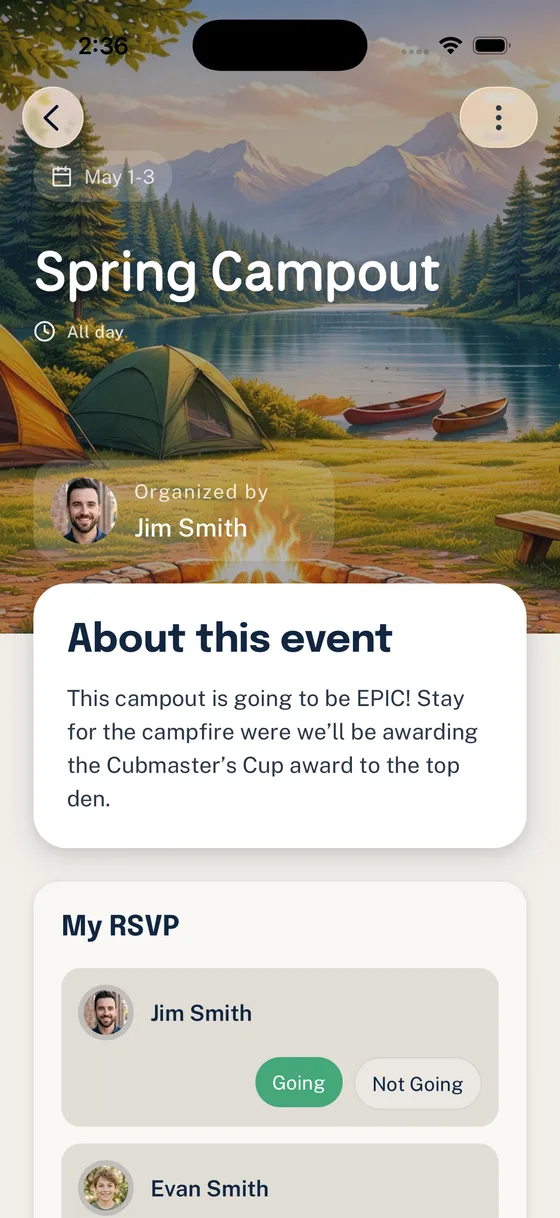
It is Thursday night, and Saturday’s campout still does not have a trustworthy headcount.
The calendar invite exists. The details were posted in GroupMe. A permission slip went out by email. One parent texted the Scoutmaster directly. Another replied with a thumbs-up emoji. The committee chair is asking how many drivers are needed, and the grubmaster wants to know whether to buy food for 18 people or 26.
The problem is not that the unit is failing to communicate. The problem is that the communication is scattered across tools that were never designed to produce one reliable answer.
That is the real question behind most searches for the best app for Scout troop communication. Leaders are rarely looking for another place to send messages. They are looking for a calmer way to coordinate families, events, volunteers, reminders, and safe communication without becoming the unit’s human routing system.
Start with the work, not the app
Before comparing tools, name the jobs your unit actually needs the tool to do.
Most Scout units need a communication system that can handle:
- Announcements families can find later
- Event details that stay attached to the event
- RSVPs that produce a reliable headcount
- Family or household context, not just isolated individual replies
- Volunteer signups with clear ownership and follow-through
- Permission slip or form tracking when the activity requires it
- Calendar visibility with reminders
- Parent and guardian visibility for youth-facing communication
- A simple enough experience for brand-new families
If a tool only helps people talk faster, it may still leave leaders with the same coordination problem.
What common tools do well, and where they strain
No single tool category is useless. Most units use a mix because each tool solves a real slice of the work. The trouble starts when one tool is expected to do jobs it was not built for.
GroupMe, WhatsApp, and text threads
Group chat works well for quick, casual conversation. It is familiar, mobile, and easy for parents to join. It can be a good place for light reminders, last-minute weather chatter, or “we are running ten minutes late” updates.
It strains when the unit needs structure. A thumbs-up is not a real RSVP. A message posted three days ago is not a durable event brief. A volunteer signup buried between jokes and photos is easy to miss. Direct messages can also create visibility concerns if adults and youth are using the same consumer chat space without clear unit rules.
For many units, the better pattern is not “delete the group chat.” It is “keep chat social, and move official coordination somewhere structured.”
Email newsletters
Email is still useful for weekly summaries, committee updates, and official announcements. It gives leaders space to explain context without flooding a chat thread.
But email is weak for day-to-day follow-through. Parents skim, miss one paragraph, or read it on a phone while walking into a meeting. Replies split into side threads. Event details get copied into newer emails, and nobody is sure which version is current.
Email is a good broadcast tool. It is not a great operating system for a campout.
Google Calendar, Apple Calendar, and shared calendars
Calendars are excellent for dates. Families need to know when meetings, service projects, campouts, courts of honor, and pack events are happening.
But a date alone does not answer the practical questions: Who is attending? Who is driving? What is the gear list? Has the location changed? Which families still need to respond? Google Calendar can invite guests and track responses, but it is still centered on calendar attendance, not the full Scout event workflow of household replies, permission forms, volunteer jobs, and leader follow-up.
Use a calendar for visibility. Do not ask it to carry the whole event plan.
Google Forms, SignUpGenius, and spreadsheets
Forms and signup tools are valuable because they add structure. A SignUpGenius can collect volunteer slots. A Google Form can collect responses. A spreadsheet can help a detail-oriented leader sort the mess.
The problem is connection. The form link lives in an email. The RSVP count lives in a sheet. The volunteer slots live somewhere else. The event time changed in the calendar, but the form still has the old date. Now the leader has four sources to reconcile.
These tools can be good helpers. They become painful when they are disconnected from the roster, calendar, reminders, and event context.
Scoutbook and Scoutbook Plus
Scoutbook and Scoutbook Plus have an official role in Scouting workflows, especially around advancement and unit records. The official Scoutbook Plus calendar help describes support for events, permission slip downloads, RSVPs, reminders, attendance, and activity logging. Leaders should check current Scoutbook help and their council expectations when deciding how to use it.
That said, many units still need a practical day-to-day coordination layer around the official system. They need simpler family communication, household-aware replies, volunteer follow-through, and event-centered reminders that match how parents actually participate.
Woggle should not be treated as a Scoutbook replacement. A healthy unit tool stack can give Scoutbook its official recordkeeping role while using another tool for the daily coordination work around events, families, and volunteers.
Slack and Discord
Slack and Discord are powerful conversation platforms. They can organize channels, preserve searchable discussions, and support active communities.
They can also be too much for a mixed Scout audience. Some parents will not want another workspace. Some leaders will create too many channels. Youth-facing spaces need especially careful boundaries. Scouting America’s Barriers to Abuse prohibit one-on-one contact between adult leaders and youth members in person, online, over the phone, or by text. Units should verify current official guidance, council expectations, and their own communication rules before using any platform where private messaging or youth accounts are involved.
These tools may fit some adult leader teams. They are not automatically the best default for every troop or pack family.
A practical checklist for choosing a Scout communication app
Use this checklist before adopting any new tool. If the answer is “no” too often, the app may create another channel instead of reducing leader work.
| Question | Why it matters |
|---|---|
| Does it understand families or households? | Scout units coordinate families, not just individual users. |
| Can leaders get a reliable event headcount? | Campouts, meals, transportation, and supervision all depend on attendance. |
| Do event details stay attached to the event? | Families should not hunt through chat history for the latest plan. |
| Can reminders target only the people who need them? | Blanket reminders train families to tune out. |
| Can volunteer roles live next to the event? | A signup is easier to act on when it is tied to the actual activity. |
| Does it reduce leader follow-up work? | A new app should remove chasing, not add another inbox. |
| Is parent and guardian visibility built into the workflow? | Youth-facing communication needs clear boundaries and transparency. |
| Is it simple for new families? | The best system fails if new parents cannot understand where to look. |
| Can it coexist with Scoutbook? | Official Scouting systems and daily coordination tools should have clear roles. |
The best tool is the one that makes the unit’s source of truth obvious.
A healthier tool stack for most units
Instead of asking one app to do everything, define which tool is authoritative for each job.
Here is a simple model:
- Scoutbook or Scoutbook Plus for official Scouting records and workflows where your unit or council expects it
- A shared calendar for broad date visibility
- Group chat for casual conversation and quick social updates
- Email for weekly summaries and longer announcements
- A purpose-built coordination layer for event context, RSVPs, volunteer jobs, family replies, and reminders
The key is to make the boundaries explicit. Parents should know where to go for the final event details. Leaders should know where to check attendance. Volunteers should know where their job is listed. Youth-facing communication should follow current Scouting America guidance and the unit’s own expectations.
When the boundaries are vague, leaders end up translating between tools. When the boundaries are clear, families can act without asking the same questions again.
Where Woggle fits
Woggle is being built as a purpose-built communication and coordination layer for Scout units. The goal is not to replace official Scouting systems or make group chat disappear. The goal is to give units a calmer place to manage the work that sits around events and family participation.
That means focusing on practical workflows:
- Units, groups, and channels that reflect how packs and troops actually organize
- Event context that stays with the event
- Family-aware coordination instead of scattered individual replies
- RSVPs and reminders that reduce manual chasing
- Communication patterns that support parent visibility and safer expectations
- Less leader overhead for routine follow-up
Group chat can still be useful. Email can still be useful. Scoutbook still has its official role. But when RSVPs, forms, volunteer jobs, reminders, and event details are spread across all of them, the unit pays for that fragmentation with volunteer time.
The bottom line
The best app for Scout troop communication is not simply the loudest or most flexible messaging tool. It is the tool that helps your unit answer the questions leaders face every week:
- Who is coming?
- What do families need to know?
- Who has taken each volunteer role?
- Who still needs a reminder?
- Where is the current event plan?
- Can parents and guardians see the communication they should see?
Choose the tool stack that gives those answers with the least confusion. Your leaders will spend less time chasing replies, and families will have a clearer path to participate.